
A powerful data comparison tool for Windows
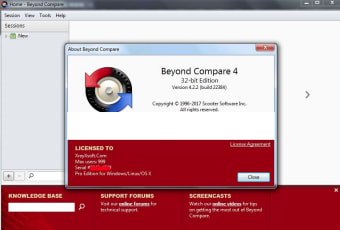
Beyond Comparison is a powerful data comparison tool for manual testers and software developers. This program can easily detect differences between text and code. It can also track changes made to specific files in a database. As such, it becomes easier for developers to check the source code’s version to retain or discard certain information. Unlike Meld, Compare It, and FreeFileSync, this utility program can also be used to check corrupted files, since it identifies changes made in the database.
Top Recommended Alternative

Beyond Compare is an excellent data comparison tool combined with a reliable file organizer. With this software, you can easily compare data, find duplicate files in multiple folders, and assess the files that you wish to keep. This program is a multi-platform tool, which can be downloaded and installed on a range of operating systems. It’s also available in multiple languages and compatible with several file formats. Moreover, it is also Windows 11 compatible. The only drawback is the limited trial license in the free version of the program.
Compare differences, sync files, and merge results
In this day and age, it’s crucial to conveniently and quickly compare differences between files. It’s a skill you can’t ignore, whether you’re working with data professionally or need to keep your files organized. However, when you have thousands of folders and files, it can be difficult to do manually.
Thus, Beyond Compare proves to be quite useful as a data comparison tool and file organizer. With this program, you don’t need to manually skim through numerous files on your PC to compare data. You can simply download and install the program to compare everything between folders, including version histories, file formats, changes made, and other information.
How to use Beyond Compare?
To use this data comparison tool, you only need to drag the folders or files to the app’s home screen. The program automatically analyzes the files or folders and displays both items side by side in a window. With Beyond Compare, you can compare audio files, text files, folders, and other items saved on your Windows computer. It’s important to note that the results could be displayed differently based on the compared file types.
How’s the information represented?
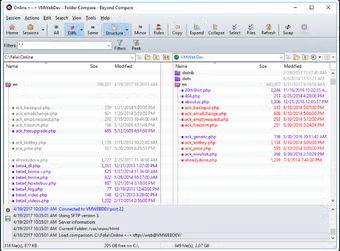
When you compare data with this program, it displays two folder lists with detailed color coding. It simply indicates if the analyzed file types are available in a single folder, both folders or if both files are completely different. The file organizer uses a range of color codes for other statuses. Thus, it becomes easier to identify issues, the same file types, and changes made to the database.
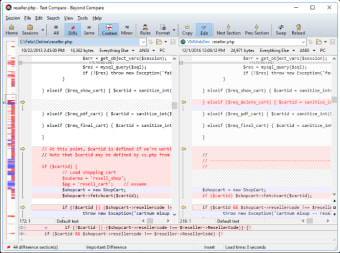
The best part about this data comparison tool is the ability to synchronize folders. With Beyond Compare, you can automatically reconcile all kinds of differences within the folders. It’s worth mentioning that all the differences in text files are highlighted in red, which makes them easier to spot.
The same is true for audio files, video files, and other multimedia file types. However, in this case, their metadata is compared and highlighted, and the contents of the files are left intact. Once you’ve compared the data, you can use Beyond Compare to copy, sync, delete, or modify files. Just like the synchronization feature, you get access to a three-way merge feature, which lets you combine all the changes in a file into a single output file.
Smoother and more accurate comparisons in Version 5
Beyond Compare’s Version 5 brings several new features for better usability. The light and dark modes allow for a more comfortable experience whether in bright or low-light environments. The new Word Wrap feature in Text Compare makes it easier to view and compare lengthy text without the need for horizontal scrolling. Additionally, Text Merge has been improved, allowing for better organization of multiline selections.
A major update, the Table Compare Overhaul, now supports comparing multiple Excel sheets and HTML tables seamlessly, making it ideal for handling more complex data. For media file comparisons, the addition of support for formats like FLAC, MP3, and MP4/AAC offers greater flexibility. Lastly, Version Compare has been enhanced with more robust error handling and better comparison of header fields, ensuring smoother, more accurate comparisons across a variety of file types.
A reliable and easy-to-use data comparison tool
Beyond Compare lets you easily and quickly compare data in folders and files on your PC. The file organizer uses powerful yet simple commands to focus on the differences in the data. It lets you synchronize the files, compare data, merge all the required changes, and generate a wide range of reports for record-keeping.
Beyond Compare proves to be a feature-packed and powerful data comparison tool, which can help you avoid manual comparisons. This not only saves a good amount of time but improves the accuracy of results. Whether you’re a casual user looking to keep your files organized or a data professional working with comprehensive data comparisons, Beyond Compare is an excellent choice.